Nowadays it is hard to avoid internet in our daily life. For each and every doubt or specifically for each of our needs, we approach internet, because it has the better solutions. There are millions of websites offering their services over the internet, can be completely accessed using a PC or a Mobile device.
Many websites offer specific interfaces for iOs, Windows phones, android, and other mobile versions in addition to PC interface. But certain website is built for only accessible via mobile, and is failed to load in PC browsers like Google Chrome, Mozilla, Internet Explorer.
Advantages
Improved website loading response
Lower data usage compared to PC's browser
Setting a Mobile User Agent
To open any mobile websites in your PC's browser, you have to change the User agent. For both Chrome and Mozilla, free user agent switcher extension is available. Locate the extension in your browser, click it, and choose your mobile user agent from the list. For Internet Explorer you may want to try the UAPick User-Agent Switcher add-on.
For Chrome Users
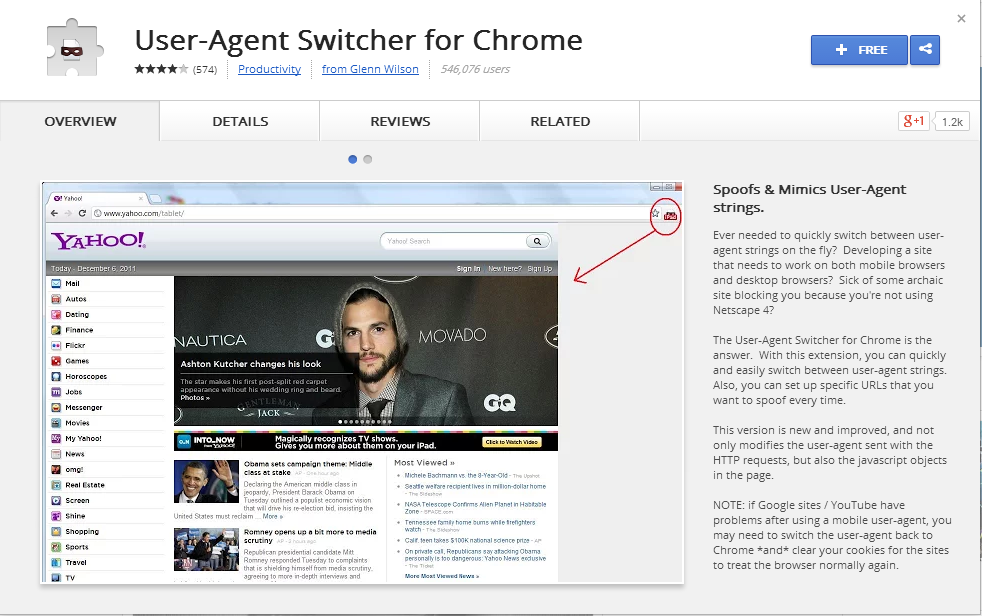
First download user agent switcher extension from chrome store using search for "user agent switcher" or alternatively from here, Download User Agent Switcher
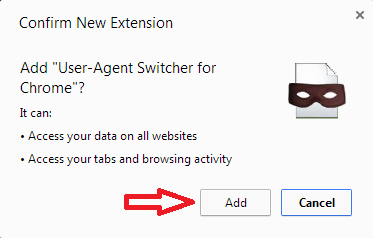
Install it on your browser by click "Add" and then open the new extension.
Now from the list of user agents choose one that you opt.
Open Mozilla browser in your PC, and search for "user agent switcher addon" in Mozilla add-ons page or you can download it from here, Download User Agent Switcher.
A confirmation box will show for the user, click Add to Firefox
Select "Install Now" button for the installation of user agent switcher
Now restart the browser for completing the installation process. After that you will get this addon on Tools menu named as “Default user agent switcher”.
Select iPhone 3.0, now you are able to see any website in mobile interface.
Additional User Agents
Some user agent switchers don’t come with a comprehensive list of user agents. For example, the User Agent Switcher extension for Firefox doesn't include an option that allows you to set your user agent to an iPad’s.
Additional user agents can be downlaod by clicking the User Agent Switcher icon and then selecting Edit User Agents. Click Download lists of user agents to import link and you will be able to download and import more comprehensive list of user agents.
Alternate Method - Opera Mini Simulator
Opera mini simulator is an another option for opening mobile websites on PC's browser. Unlike in mobile user agent switcher, it doesn't need installation of any software. Just follow the steps
Open your current PC browser and paste below link in address bar http://www.opera.com/developer/opera-mini-simulator
Now a dialogue box with asking your permission for running Jave Object will show up, click allow and run opera mini simulator
Now , to open any websites in mobile version, just use mobile simulator.
There are many parents who wish to block certain website in their computer, but they don't have the better solution. The reason why they prompt to block such website, is to keep their child from any danger that possibly come through the viral internet. Facebook, Twitter, YouTube are those site listed in top of red category chosen by millions of parents.
You can get different solution on How to block a website in the market, but there you must spend some dollars. Here you can get the simple Unlimited, Free solution for how to block websites, that can adopt without spending even a penny. Let me explain...
Enter “C:\Windows\System32\drivers\etc” in the Windows search bar or navigate to the folder by clicking your way through Windows Explorer.
Double-click hosts and select Notepad when prompted to choose a program to open the file with.
In Notepad, you will see several lines of text used for mapping purposes. Underneath the last line of text (it should say something regarding a local host),
enter “127.0.0.1″ and press the spacebar. Now type the specified address of the website you wish to block on the same line. For example, type “127.0.0.1 www.facebook.com” to block all traffic from the popular social site.
Continue to block websites you wished in this manner, each beginning with”127.0.0.1.” followed by a space and the appropriate website. Make sure to only use “www” and avoid adding “http,” unless you want to render the entry invalid, and do not alter any other text in the hosts file.
Click the File option in the top-left-hand corner, choose Save – do not change the name or save location – and ignore any warnings regarding editing the hosts file. Close Notepad when finished.
You have Finished.
Now just check the result. Keep in mind that it will take few minutes to take effect. You can remove this block by deleting the line you typed to block that website .
A mobile phone is also called cell phone and cellular phone in some regions. Almost all phones in the market are now equipped with a digital camera (camera phone). There are different occasions on which cell phone or mobile phone users may delete their valuable pictures they have taken. This may happen when formatting the phone memory card by mistake, or damaging the memory card in the phone, or losing the photos on the memory card for some reason.
There are several memory card types used in cell phones and Digital Camera such as Memory Stick Micro (M2), which is widely used in Sony-Ericsson phones. MicroSD, MiniSD, MicroSDHC, TransFlash card, RS-MMC are other popular phone memory card types used in Nokia, Motorola, and other phone brands.
You can use any of the Memory Card type as your external data storage device along with inbuilt phone memory. When you use Mobile phone, there are two storage option one is SD card (Memory card) and second one is Phone memory. Once you delete/lost Pictures, Songs, Videos, films from Mobilesand Pictures from digital camera, it is difficult to regain removed file.
How to Recover Lost Data From Mobiles, Digital Cameras.
Supported Card and Storages
All mobile memory cards
SD Card(Secure Digital card), MicroSD (TransFlash), SDHC, miniSD card
MMC card MultiMedia card
CF card , Compact Flash card, CF Type I, Type II, MicroDrive
In this post you will learn a cool computer tricks on how to Create an undeletable and unrenamable Folders In your Windows operating system. This cool computer tricks makes you to protect any file without any risk.
Most of the People are not aware that it is possible to create Undeletable, Unrenamable folder in windows, specifically without the use of any software.
Try to make a new folder in windows & give it
name con,aux, lpt1, lpt2, lpt3 up to lpt9. you won't
be allowed to create folder with above mentioned
names, Because they are reserved words in
windows.To get this tips & tricks follow the simple
steps given below.
Go to Start
Type cmd & hit enter (To open Command Prompt ).
Remember you cannot create Undeletable & unrenamable folder in your root directory (i.e. where the windows is installed) That means you can't make this kind of folder in C: drive if you installed windows on C:
Type D: or E: and hit enter
Type md con\ and hit enter (md means- make directory)
You can also use other name such as aux, lpt1, lpt2, lpt3 up to lpt9 instead of con in above step.
Now open that directory, you will see the folder created of name con.
NOTE: When you try to delete that folder or rename that folder, windows will show the error message.
How to delete that folder ?
Open Command Prompt as the first step on how to create.
Type D: ( do this if you have created this type of folder in D: drive) & hit Enter.
Type rd con\ (rd means - remove directory)
Open that directory and the folder will not any more appear.
In my previous post i had given a tutorials on How to hack Google chrome to get all savedpasswords ? In this post i will share some interesting tricks on how to view saved password in Mozilla Firefox web browser. This trick can be very helpfull if you get your hands on someone computer maybe when you use the friend's computer and he has saved password for certain websites like twitter, gmail, facebook,yahoo etc. You can easily view his password with very simple and easy method that is shared here. There is no need of any software to be installed. Just go through the post.
Hi friends,in this post I will show you how to find the saved passwords in Google Chrome. This trick is simple but very powerful to view or hack saved password in Google chrome. This is not website depending one, means which website the password is saved it will work on all of them.You can find the saved passwords for even Facebook,Twitter, G mail, and more. If you get your hands on your friend computer you can hack their password with this simple little trick. This method is absolutely manual and no need of any software to be installed on your computer. Read this post carefully.
STEPS
*1. First open your Google Chrome. *2. Go to Setting.
*3. Select Advanced Setting.
*4. Scroll down there will be password and forms from there click Manage saved password.
*5. A list of website on which you/them saved password will show up.
*6. Select show and enjoy.
NOTE: Advanced setting will be at the bottom of your setting page [after you select setting by opening Google Chrome]. You can get the saved passwords in all website. Keep mind that try to avoid saving your password in your browser, because a normal computer knowledge is enough for it and you may get hacked.
Hi friends, do you like to get the IP address of a website? here it is. You can find the location of any website's server and can do more stuffs. The key requirement is CMD (Command Prompt), which is already integrated in almost all Microsoft computer system . Only you have to follow the given steps. I am describing it with Google but you can get any website's details like Facebook, twitter etc.
STEPS
* 1. Click Start * 2. Type cmd/CMD * 3. Now write ping followed by website url whose ip address has to find.
* 4. It tooks 4 to 5 seconds and come with result. Showed below.
Hi friends, some of you are bit bored with yellow colored folders, here you get a change. This post is made very simple for it. Window OS not allow you any direct change to the Folders Color. So I recommend a third party software FOLDERICO 4.0 having 4.1MB size. Here you can directly choose any colored folder without a long search. Please choose either free or paid download and then use this method to change color of any folder in your Window OS. Please carefully go through the post for the exact procedures. See: How to Make Your Computer Speak Whatever You Typed
STEPS
1) First download Folderico (4.1 MB size).
2) If it is a Zip file extract it. Use WinRAR For Unzipping.
Many of the users do not know how to password protect their Folder in the computer. Here I can give the best option for them. Using the application named FOLDER LOCK is the key for it.
It is a simple method that allows you to Password Protect your Movies / Songs / Videos / Secret Files / Data without the usage of secondary data storage like Pen drive, SD Card.
9) You have done, your Folder is now Password protected.
10) If you are premium member you get additional feature to set the level of password protection Very Fast, Medium, Little Slow. Choose your own such that protection is more strong from Little slow mode to Very fast mode.
NOTE: If you are Free member simply click the exit button after you typed password and if you are a premium member choose the best level of password protection.



![firefox-hack [Techzilla Firefox]](https://blogger.googleusercontent.com/img/b/R29vZ2xl/AVvXsEh9F2ZXByzgKRwdBuf00bo8-J_kpLo_MjxijLljZxn2yJ-sMAnr3edXt4mi3unoKZXg27HbIfG80kaPjWvFVVfAT0eG1duSeyoifIfxsLTiBxIXruQVqOHy3t0E1vLYBpVATp533W-Iut8h/s1600/firefox-hack+%5BTechzilla+Firefox%5D.jpg "firefox-hack [Techzilla Firefox]")


![How To Hack All Saved Passwords In Google Chrome Without Any Software [Techzilla Firefox]](https://blogger.googleusercontent.com/img/b/R29vZ2xl/AVvXsEhcD2Khufyhrjp0tj0sbzeCwleJaK6fqP4WMdf-FJ7IjmnGrYI-thR60POB-GV6awEJuwQA1yMT9ym0jv0IqATly-h5I2RJntH8Q1w9VcpidDb1DCPH57HocVunvYCjQa3-I7uEzkh44fsz/s1600/How+To+Hack+All+Saved+Passwords+In+Google+Chrome+Without+Any+Software+%5BTechzilla+Firefox%5D.PNG "How To Hack All Saved Passwords In Google Chrome Without Any Software [Techzilla Firefox]")


![find-website-ip-using-cmd [Techzilla Firefox]](https://blogger.googleusercontent.com/img/b/R29vZ2xl/AVvXsEh4VLcRaG3KaakSzI7XsO2NdWyHWpeZxyRVrGdVgYAg4x7sDi-8o_1Lg3la3b32smvs9Tvm6LM5HNq-sA0mYYYbFv37-W-vbaE_Le8pL4jBw-jviRymE1xst0pdV9n3R3sAu6ggJwlwwZy8/s1600/find-website-ip-using-cmd+%5BTechzilla+Firefox%5D.jpg "find-website-ip-using-cmd [Techzilla Firefox]")
![find-website-ip-using-cmd [Techzilla Firefox]](https://blogger.googleusercontent.com/img/b/R29vZ2xl/AVvXsEiKb9ElVxHuL80Alc3j6efJvo176kl5_qPWkYPSln1vgDP4sXIJFu4iBF2WIlGUt5fbdkvSCtxczz8EgUWAHDNTGvJcQGmEXPSXUwP276cJC-6PNZ6LJudjhHWWP2rhBx-m5kmAs3Ai_KoL/s1600/find-all-website-ip-using-cmd+%255BTechzilla+Firefox%255D.jpg "find-website-ip-using-cmd [Techzilla Firefox]")


