
Sorry This Website is On Repair .........
Showing posts with label FREE MONEY ONLINE. Show all posts
Showing posts with label FREE MONEY ONLINE. Show all posts
What Is Google Adsense? How To Make Money With It- $20 - $150 Per Day
![Google Adsense - Make Money [Techzilla Firefox]](https://blogger.googleusercontent.com/img/b/R29vZ2xl/AVvXsEhXb97L30M9USXREK9DweDp431q05SLfn_5AgKS8adr_2R4_NPYyk1amMqiH1CHwqUVvyEimC08FG8-V2irq-PiGeIKIXq_KXWrbMvLy3rqm59z4FKRcxQvF9Wd5u7wLyn0eqd6W-7P79jn/s1600/Google+Adsense+-+Make+Money+%5BTechzilla+Firefox%5D.jpg "Google Adsense - Make Money [Techzilla Firefox]")
Many of you are well aware of Adsense, but majority don't. AdSense is a Google's program that allows bloggers and website owners to make money by displaying Google ads. you can see such kind of advertisement in many pages, including in my website. The more benefit is basically for Google and you get a small percentage. There are two ways of getting money from AdSense:
Impressions – this is based on the number of pageviews of pages or posts with ads.
Clicks – this is based on how many people click on the ads (do not EVER click your own ).
You must sign up at Google Adsense and choose your advertisement. You can choose how your advertisement look like, where they show up, and even what kind of ads you’ll accept. Once you get to a minimum of $100, Google will either send you a paper check or make a direct deposit into your one bank account provided in account settings. Remember for Indian users, first Google will send a pin number and they must verify.
Requirement: [Any one of the following]
- Blog
- Website
- YouTube Video
AdSense always loves websites that contain rich content. Content can be of any kind (text, images, videos), provided that it does not violate the AdSense content policies. It is suggested that having text on the pages make AdSense crawler can understand better what the website is about than any other formats. AdSense service is more suitable for websites that publish articles, how-to guides (Techzilla Firefox.blogspot.in), but other types of websites are also well earning through this service.
How Much Can I Make?
You can make $1 to $50000 per year or even more. All this depend on your website traffic.
IMPORTANT!
There are a few things you need to know about AdSense before you ever put the code into your blog.
1. Do not, ever click your own ads. In case you are not aware, Google pretty much knows
everything And they can tell if you’re clicking your own ads. It’s very tempting to click about
100 or more times and make some money, but all it will do is result in being banned. Don't
do this.
2. Never ever encourage friends or family to click your ads. You will banned from AdSense, and
don’t ever think Google won’t figure it out. They have a number of well standing algorithm.
Which makes you lifetime out service.
3. Never rely on AdSense as your sole income source. Even if you get really good at SEO and
you may have 10 websites making thousands of dollars each month in AdSense, you never
know when something could happen to trigger Google’s no-no sensors.
4. Do not use more than 3 advertisement blocks on a single page. Google allows maximum 3
ad blocks on a page. So if you have one in your header, one in your sidebar, and one at the
end of your post, that’s the limit for that page. Remember don't make your visitors struggle.
You can ask any doubt here or in my Facebook Profile [Jikku Thankachan]
Top 5 Free Web Hosting Sites
Hi friends, getting your blog into a website or web hosting isn't difficult today. You can get a number of Paid as well as Free web hosting services and the choice is yours. Only you have to consider about your web hosting plan. It includes Total web space, total bandwidth per month, Hosting Domain, SEO. Below you can find best 10 Free/almost free($.001/month) web hosting plans. Choose one that best matches your need. Good luck!

To get start you must create an account in any one of the website hosting site. Then you can simply create or host your website.Simply follow the instructions they provide.
1. Biz.ht Hosting
This offers Best ECO-Friendly Free hostingservice plan:
- 250 MB of web storage, 5 GB of monthly transfer, 100% Green energy (wind power),
- PHP5, MySQL5, CGI, Wordpress, FREE domains: personal .me.ht, and business .biz.ht..
2. 100webspace.com
This offers:
- 100 MB of web space, 3 GB of data transfer, 3 POP3/Webmail accounts, FrontPage support,
- PHP/MySQL, CGI-BIN, SSI, FTP support, Password protection, Free scripts installer, etc.
3. ByetHost.com
This offers:
- 250 MB of disk space, 6 GB monthly bandwidth, unlimited POP3/Webmail accounts,
- PHP/MySQL 3 databases, 5 subdomains / add-on domains, Automatic scripts installer, etc.
Free web hosting with NO ads
4. Biz.nf Hosting
This offers:
- 250 MB of free webspace, 5 GB of bandwidth,
- POP3 account, SMTP access, Webmail, FTP support,
- PHP 4/5, MySQL, CGI/Perl, SSI, 1-click setup of WordPress blog,
- 3 FREE domain names at .co.nf (www.yourdomain.co.nf), etc.
5. FreeHostia.com Hosting
This offers:
- 250 MB of web storage, 5 GB of transfer, POP3/Web-based email with Spam protection,
- 10 sub-domains, PHP, CGI/Perl, SSI, MySQL, FTP support, 404 error pages, etc.
Other Site You Can Consider
Make Real Money With Your Blog / Website - Bidvertiser #1 Google Adsense Replacer
Now a days there are many ways of earning money via online. The Advertisement, share market, Gambling, Surveys are at the best among many. These all are categorized into two zone, one need the initial investment and the second doesn't need. Share market, Gambling are first category and the Advertisement-Publisher and Survey belong to second category. First I've prefer the second one when I have got no initial investment, particularly the Advertisement. There are a lot of people who get the money through it. All they need is a Website or a Blog. Here I share the method on how to earn money through Bidvertiser a #1 Adsense replacer.
![bidvertiser-make money online-by-your-blog-or website [Techzilla Firefox]](https://blogger.googleusercontent.com/img/b/R29vZ2xl/AVvXsEiy5ZLmr-8tltyc8U8ZW-yXHExa8HhXzwBNv1WzTtkmWZ4aWhJV-S_SJBkuzJCIiXuMN6p-ubMf_6WelxjH1hyphenhyphenvC4tuRuU8hT4tsa_tOModCqQKuhkVrOLbBwIhJjGEKad2C_mXGeFSEULB/s1600/bidvertiser-make+money+online-by-your-blog-or+website+%5BTechzilla+Firefox%5D.jpg "bidvertiser-make money online-by-your-blog-or website [Techzilla Firefox]")
About Bidvertiser
Bidvertiser is a website which is the #1 replacer of Google Adsense. This is a advertisement promoting site having billion of active Advertisers and Publishers. Advertiser are those who give the advertisement to promote their products, getting sale and so on, while Publisher is you means who put/promote the advertisement via their blog or website. If you really need to make money with your blog, Bidvertiser is the choice until you got Google Adsense. This site will pay based on cpm (Click Per Impression). Higher the traffic , you will get more money. In addition to each valid click on your advertisement they will provide you some extra point Revenue Point which is the combination of your [Total Impression+Views]. If you really need to put some extra money in your pocket just follow.......
STEPS TO GET REAL MONEY WITH BIDVERTISER
Sign Up for a Publisher Account Here.
You will get a confirmation mail in your mail id that you have chosen while sign up.
Click to confirm and Log In toBidvertiser using your Username and Password.
Select add new website ---> Enter your website details and submit it.
![bidvertiser-make money online-by-your-blog-or website [Techzilla Firefox]](https://blogger.googleusercontent.com/img/b/R29vZ2xl/AVvXsEgvEcErKuD5Vz8heK6-5j62k8b3PgwJZNdQS2ExtwSbd7l_VXrwDIeukHLfBoOE9qfj_BoBsoVG4BSXFPlfHD4PCUHpYuDsCW6lGwxj-4Js3lO7fKRYpMwW0icyDvGXQtbPORbqxr1Xpnpo/s1600/bidvertiser-make+money+online-by-your-blog-or+website+%5BTechzilla+Firefox%5D.PNG "bidvertiser-make money online-by-your-blog-or website [Techzilla Firefox]")
Now come back to Publisher centre ---> click choose template. Here you can set which sized Ad are you looking. You can choose Banner, Mobile, Rectangle, Skyscape.
![bidvertiser-make money online-by-your-blog-or websites [Techzilla Firefox]](https://blogger.googleusercontent.com/img/b/R29vZ2xl/AVvXsEjxvRTDKsewRWL4-aUSoGKGkw3jms_DPVpI_2FP-WJ-Fp0ECHcsN2INhXshVIp2MxXKV2HA-lbq-CG7voaV8jZI89VNC9MrlD5JJGgfY8HOIhOaqGzA_YuSbWPaRkxZwy3FwCq3M0X8rTzb/s1600/bidvertiser-make+money+online-by-your-blog-or+websites+%5BTechzilla+Firefox%5D.PNG "bidvertiser-make money online-by-your-blog-or websites [Techzilla Firefox]") |
| Add caption |
Now click Getcode, and copy that.
Open your Blog and select Layout--->Select Add Gadget--> Select
HTML/Javascript. Now paste the code and click SAVE.
Now your advertisement will start to show up for your visitors and you will get the real money.
![bidvertiser-make money online [Techzilla Firefox]](https://blogger.googleusercontent.com/img/b/R29vZ2xl/AVvXsEiazX58mHaTKQbgS3cwjtUTe2uy5BWWejssYWaXzzLVotfWLkVW9AACEHbM3wj_MK6GuOlx1vV3ci18X0JE1OS2yhhs-BYySpFUfHFRPofTesMtJSf2ezOdJ5nUup_bKQ2GWKvPB0ukUjLW/s1600/bidvertiser-make+money+online+%5BTechzilla+Firefox%5D.PNG "bidvertiser-make money online [Techzilla Firefox]")
CAUTION: For withdraw the money you must have a PayPal Account so must follow this two
How To Create A PayPal Account For All Online Money Transaction.
How To Verify or Link Your PayPal Account With Your Bank.
How To Verify Or Link PayPal Account With Bank - Online Money Transaction
Hi friends, Do you have a Paypal acoount? Paypal is nothing but a service utilized by billion users for online money transaction. You can purchase, deposit and recive money anywhere in the world and lot of other services. I have already post How to create a Paypal Account. Here I post the method on how to verify your account with Bank. Once you have registered in PayPal next step is account verification. For that you must enter a valid bank account, then follow the instruction
![paypal verification [Techzilla Firefox]](https://blogger.googleusercontent.com/img/b/R29vZ2xl/AVvXsEgG0Vc1R3jM2VwW8uDA7fEnOq6RIbENmFbzs986OGbvA-A6YLbMHs5ziF6jNxp6lIx-3FMasrAs3vRJyosjLG0S5Q662zYzHJC3EIuxuxea22CLehSIAH0F5z_ubkJ7eGE0Dda0Lf0KSTkd/s1600/paypal+verification+%5BTechzilla+Firefox%5D.jpg "paypal verification [Techzilla Firefox]")
STEPS
* 1. Sign In to your Paypal Account.
* 2. Go to the Account section and select link bank account.
![paypal bank verification [Techzilla Firefox]](https://blogger.googleusercontent.com/img/b/R29vZ2xl/AVvXsEhjt3ZdHziGVfYjvAdKrwVbKFKUcoT9HdRtW8ZqyYzRzlN62Edunf35DvwNnaTKOdQIP_5sUJd0nNjb1LzhAYgPEf82EatliwIRt2NlCHnhCY1lwisdycAdpS5TkVtPykivj5g12ynZBAdQ/s1600/paypal+bank+verification+%5BTechzilla+Firefox%5D.png "paypal bank verification [Techzilla Firefox]")
* 3. Now type your Account details in that bank like.
IFSC code of bank
Type of Money card you have (Mastercard, Visacard, check other on
verified Paypal site )
Type number, CV number and expiry date of the card.
* 4. After the completion select Confirm Bank Account.
* 5. They will send two small amount money (.001$-01$) to your account.
* 6. Now wait few days and check your bank balance. Enter the two money
value they sent into your Paypal Account.
![link bank account with paypal [Techzilla Firefox]](https://blogger.googleusercontent.com/img/b/R29vZ2xl/AVvXsEi2tpZYCiiVaBQs5Nj_4sP-VnCt4yFpJyuh6ZS-bOqZXMx8Kbs44golFSbxkZ-O48vRfdFKX35HotpY5b6qHj7CZKkjKnGbIVlYjbxs0nJfU6ME6OF4iRufZDiXciaNKjV21QnjwXN9SI60/s1600/link+bank+account+with+paypal+%255BTechzilla+Firefox%255D.png "link bank account with paypal [Techzilla Firefox]")
* 7. You have done. You can now do any online money transaction.
![paypal verification [Techzilla Firefox]](https://blogger.googleusercontent.com/img/b/R29vZ2xl/AVvXsEh_6kvGegwgBUa4pWIvQctGMpuOv_LVKwV504Zt6WiL50XHuom6JK5_hRwFqlx7Gmm5hbnblzT3Ro682p8yt_rpnoAz6OChnDl7wy8-g1jk746Ei9tGL9y04znK6oGXILGnL8_7I3tHdPrm/s1600/paypal+verification+%255BTechzilla+Firefox%255D.png "paypal verification [Techzilla Firefox]")
you may also like;
Make Any Blogger Widget Sticky - Get More Attraction to Your Blog / Website
Hi friends, some of you may be heard about the sticky widgets. For example famous websites like Facebook, twitter has navigation bar that comes with or stick at the bottom when we scrolled down. I think now you got the term sticky widget. It is mainly stands for attracting the users by highlighting certain widgets like popular posts, recent posts, advertisement and so on. Here you can directly get code for this widget. Simply follow the steps.
![sticky-blogger-widgets[Techzilla Firefox]](https://blogger.googleusercontent.com/img/b/R29vZ2xl/AVvXsEjGNez3gyLfJF3oa3RsPMSB2lur4GTLN_pMxSsZ4OrSU99hs1fVK2KmiPHlyZBFnX9DMGS2m6cKxiuMDK5M1PBtly5lpmz4KvjVVLB55nB75r4D2RpyEMWApICKZO8TIcZ0Yv49wfIXzigi/s1600/sticky-blogger-widgets%5BTechzilla+Firefox%5D.jpg "sticky-blogger-widgets[Techzilla Firefox]")
* 1. Log in to your blogger account.
* 2. Select layout form side bar.
* 3. Click on edit widget or add new gadget.
![Make Sticky Widget For Blogger [Techzilla Firefox]](https://blogger.googleusercontent.com/img/b/R29vZ2xl/AVvXsEhH_QVOI6x22qrH-L2nptaGnnOMXpYtWAIeHBcA_9WTkpWnqf-wJN7BUuErKvAoRq9Ru7R6xxt8P2MjEB_o3cHd5AUKmim0cBVkv27bqpbIiRvSxg52yYr6eOmBufm1hkza-3pa9AVq_nxt/s1600/Make+Sticky+Widget+For+Blogger+%5BTechzilla+Firefox%5D.PNG "Make Sticky Widget For Blogger [Techzilla Firefox]")
* 4. Select HTML/Java Script.
![Make Sticky Widgets For Blogger [Techzilla Firefox]](https://blogger.googleusercontent.com/img/b/R29vZ2xl/AVvXsEhhj8ducuwq_VI7ircmVH_w1WV_Q9ZsSn-8eMXveHWsFk1J6-L2aa96GUHqanWnR1EnGcQt8mAoCLHNUWISm7s3wv3GZEeaT3gY6mh5-NS0KzKBP0LU1fdmzIhc-oNeRA6QHcFMz8dKPqXh/s1600/Make+Sticky+Widgets+For+Blogger+%255BTechzilla+Firefox%255D.PNG "Make Sticky Widgets For Blogger [Techzilla Firefox]")
* 5. Copy and paste below code.
<script>
//<![CDATA[
bs_makeSticky("YOUR_WIDGET_ID"); // enter your widget ID here
function bs_makeSticky(elem) {
var bs_sticky = document.getElementById(elem);
var scrollee = document.createElement("div");
bs_sticky.parentNode.insertBefore(scrollee, bs_sticky);
var width = bs_sticky.offsetWidth;
var iniClass = bs_sticky.className + ' bs_sticky';
window.addEventListener('scroll', bs_sticking, false);
function bs_sticking() {
var rect = scrollee.getBoundingClientRect();
if (rect.top < 0) {
bs_sticky.className = iniClass + ' bs_sticking';
bs_sticky.style.width = width + "px";
} else {
bs_sticky.className = iniClass;
}
}
}
//]]>
</script>
<style>
.bs_sticking {background:#f2f2f2 !important; position:fixed; top:0; z-index:9999; box-shadow:0px 10px 4px -5px rgba(0,0,0,0.3);}
</style>
* 6. Now you have to get your widget id and add that instead of "YOUR
WIDGET ID" at the code.
* 7. To get the Widget ID click edit button of widget which has to make as
sticky widget. See image below.
![Make Sticky Widget For Blog [Techzilla Firefox]](https://blogger.googleusercontent.com/img/b/R29vZ2xl/AVvXsEh44SQEaoN7kmoV9abKQE07OznYSdEwRMA4DeHH2NUgLMJTkAYxcZeGBZFPyVQ_1P1W5ZCiH7OZYGbWyQztIGFgMuxS-LWv4xoHMMnOai1574RjvJwBX9Ps_R0g2adxJ_FYNEQMCDlJdWGt/s1600/Make+Sticky+Widgets+For+Blogger+%5BTechzilla+Firefox%5D.PNG "Make Sticky Widget For Blog [Techzilla Firefox]")
sticky widget. See image below.
* 8. Now a pop up window will come. look at it's toolbar, at the last you will
find widget id=
It look like HTML 10, HTML 11, HTML 12 or something else. Put this ID
instead of red colored label in the code.

find widget id=
It look like HTML 10, HTML 11, HTML 12 or something else. Put this ID
instead of red colored label in the code.
* 9. You have done.
How to Backup Your Blogger Blog Templates And Posts
Hi friends, my this post is related to Back Up Your Blog . Blogger is one of the world popular Google's platform . Millions of people use this for earning real money from their blogs. But there is some disappointing factors . One of the biggest problem is that, they have the control of your blog .So they have the right to do anything with your blog particularly delete it permanently. This circumstances comes when you violate the terms and conditions of Google .The same happen while your blog is a spam promoter or have adult content. You won't get any time to remake it or modify the content with Google T&C. so the better tool is to Back Up Your Blog entirely.By this service you can always retain your blog contents and posts, even though it is removed from your account. I suggest a periodic back up of your blog.

Taking backup of Blogger blog:
You can take the complete backup of Blogger posts. Only you have to do is to click the export option showed in the below image. The back up file is in the .xml format.You can save it in your desktop or in other secondary storage devices. If your blog is cancelled due to any known or unknown reasons, simply click import option as in figure and select your .xml file to upload. Now your entire post will restored in to the new blog. You should do back up weekly or monthly depending upon your status, because it is manual process.
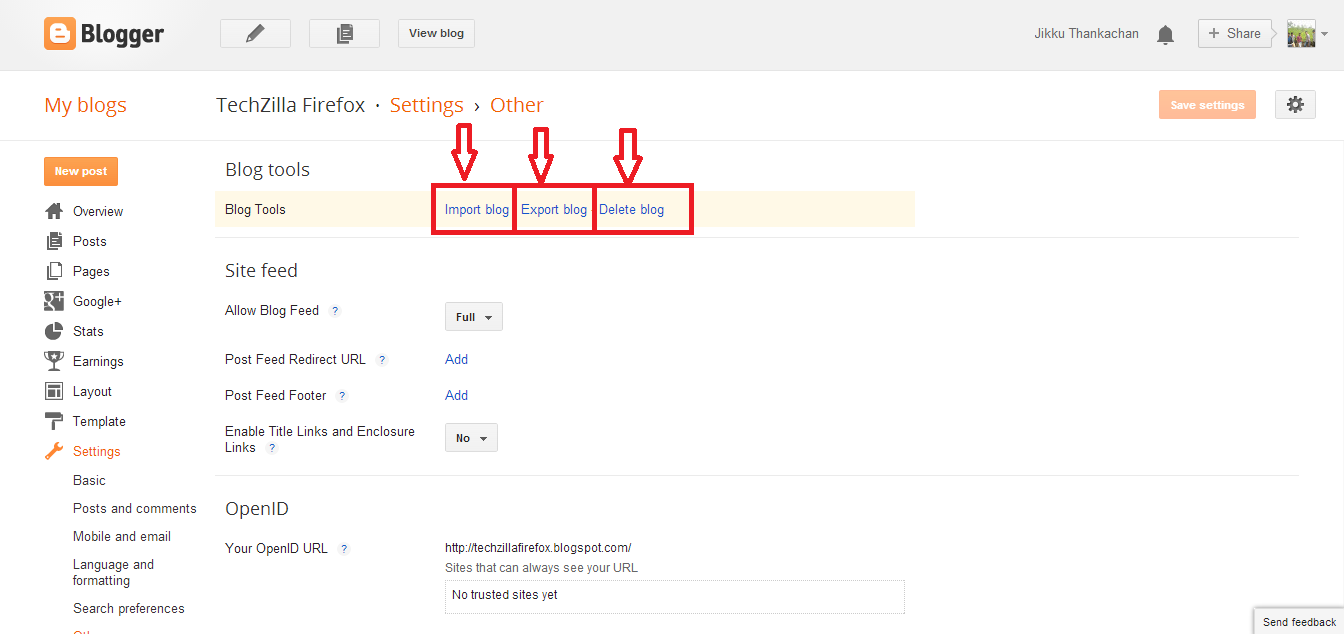
A better idea is to take a backup of your customized Blogger template and full blog [simultaneously happens when you click export option] at regular interval. This can avoid major two problems they are:
If your blog get deleted, you will have a complete back up of your theme/template and entire post depending upon when you did the back up.
If any time, while you playing with template code, you made some mistakes, you can then quickly restore the template from the back up file in your system.
Conclusion
Keep back up your blog regularly and use Google drive or on Dropbox for the storage, so you can access it from anywhere.
Thank you
Is this post helpful for you?
How to Create a Paypal Account For All Online Money Transactions
Hi friends, many of you have heard about the Paypal Service. It is a platform for online money transfer. For the Purchase (Example: eBay, Lenscart), Net-Banking, On-line Paid Game etc, Paypal is mandatory. Here you can get the complete steps on how to create the Paypal account. Read carefully through the post.

REQUIREMENTS
- Valid Email Id
- PAN CARD
- Recommended Bank Account With Valid Creditcard/Debitcard.
Once you registered in Paypal you will be provided with a Mail Id and Password you entered for the account creation. You can change those later. Now use that Id and Password to Log In to your Paypal Account.
STEPS
The entire procedure is described below using the Image.
Section-I
Go to Paypal Site

*1. Enter your Valid Email Id
* 2. Choose a Strong Password
* 3. Retype Your Password
* 4. Type Your Legal First Name
* 5. Legal Middle Name
* 6. Legal Last Name
* 7. Enter Your Legal DOB [Date Of Birth]
Section-II

* 9. Type Your Address (1)
* 10. Type Second Address (Optional)
* 11. Select Your State
* 12. Enter Your PIN Code [Indians]/ Zip Code [Foreigners ]
* 13. Enter Your Mobile Number
* 14 Click "Agree And Create Account"
YOU HAVE CREATED AN ACCOUNT
Section-III
A confirmation mail has sent to your mail account. Click the link which direct you to a new window showing your Paypal is verified and request you to Log In again. Now you have completed the half step. Next step is to add your PANCARD and link your CREDITCARD / DEBITCARD. You have finished, let's do some online business.
THANK YOU!!!
How To Improve Your Blog / Website Traffic- Free Web Directories
Are you looking for getting more Website / Blog visits? then this is the exact solution. There are so many website giving you this chance. The process you are going to do is commonly named, "PING MY BLOG". You just need to enter your Website's /Blog's Name, URL, RSS FEED (optional) in the required field and click submit.
See: Auto Scrolling Recent Posts Widget For Blog- Updated Version
See: Auto Scrolling Recent Posts Widget For Blog- Updated Version

How It Works?
See Also: How to Guides For Your Daily Usage - 2014 Google Guidance
FREE Or PREMIUM Subscription.
Once you reach such website, you can choose either Free Or Premium Subscription. The difference between them is that, in Premium Ping Plan, the number of search engine to which your Blog/Website is submitted will be more as compared to Free Plan .
TOP 10 FREE WEBSITE
- TotalPing
- Pingoat
- Pingomatic
- Google Ping
- Auto-Ping
- Ping.in
- Ping Sitemap
- Blog Ping Tool
- Pingler
- PingGates


